Agent Memory Is in the Wrong Place
How we gave agents files, grep and sed without tying anything to a sandbox

On this page
Ask anyone building agents about memory and you'll hear about what to remember, which facts to extract, how to summarize them and whether to embed everything. You'll rarely hear about where those memories should live, because the answer looks obvious. Most managed agents are tied to a single sandbox, and that's where their files already are.
But an Omnara agent doesn't need a machine at all, and when it does, it can have fifty: a laptop, a VM in your VPC, a dozen cloud sandboxes it spins up for a test run and deletes when it's done. Any of them can go offline, lose access or disappear mid-conversation, and the agent keeps going.
That only works because the agent itself doesn't live on any machine. Every message, tool call and result in its conversation goes into a log in Omnara's control plane. The control plane is the set of servers that run Omnara itself, whether we host them or you do, and none of the agent's machines are part of it. Rather than keeping a process running for each agent, the control plane has a pool of workers. Whenever a new message comes in, any free worker reads the agent's log, asks the model what to do next and records the answer. Tools that don't need a machine run right on that worker, while shell commands go out to one of the agent's machines without the worker waiting on them. When a command's result lands in the log, whichever worker is free takes the agent's next turn. No worker or machine ever owns the agent, which is why it can lose any of them and keep going. A sandbox is just something the agent uses, not somewhere it lives.
The machine is still the most natural place to put memory. Agents are at their best with files on a machine, where they can list, grep and edit them with the same tools they use for code. But when machines come and go, and an agent can have dozens at once, none of them is an obvious home for memory.
One obvious option is a database. With that backing, memory gets one home that no machine owns, and every worker can reach it. But agents don't work with databases the way they work with files. They'd have to learn whatever query and edit tools someone built on top of it, instead of the grep and sed they've seen countless times, and search could only do what those tools allow.
We wanted both: one home for memory that isn't tied to any machine or sandbox, as well as real files with real tools. Files have to live on some computer, but it doesn't have to be one of the agent's.
A Filesystem No Machine Owns
The agent's log already lives in the control plane, not on any machine, so we decided to put memory there too. Memory is a filesystem mounted by every worker that runs agents, so whichever worker picks up an agent's next turn can read and write that agent's memory directly, whether or not any of its machines are online.
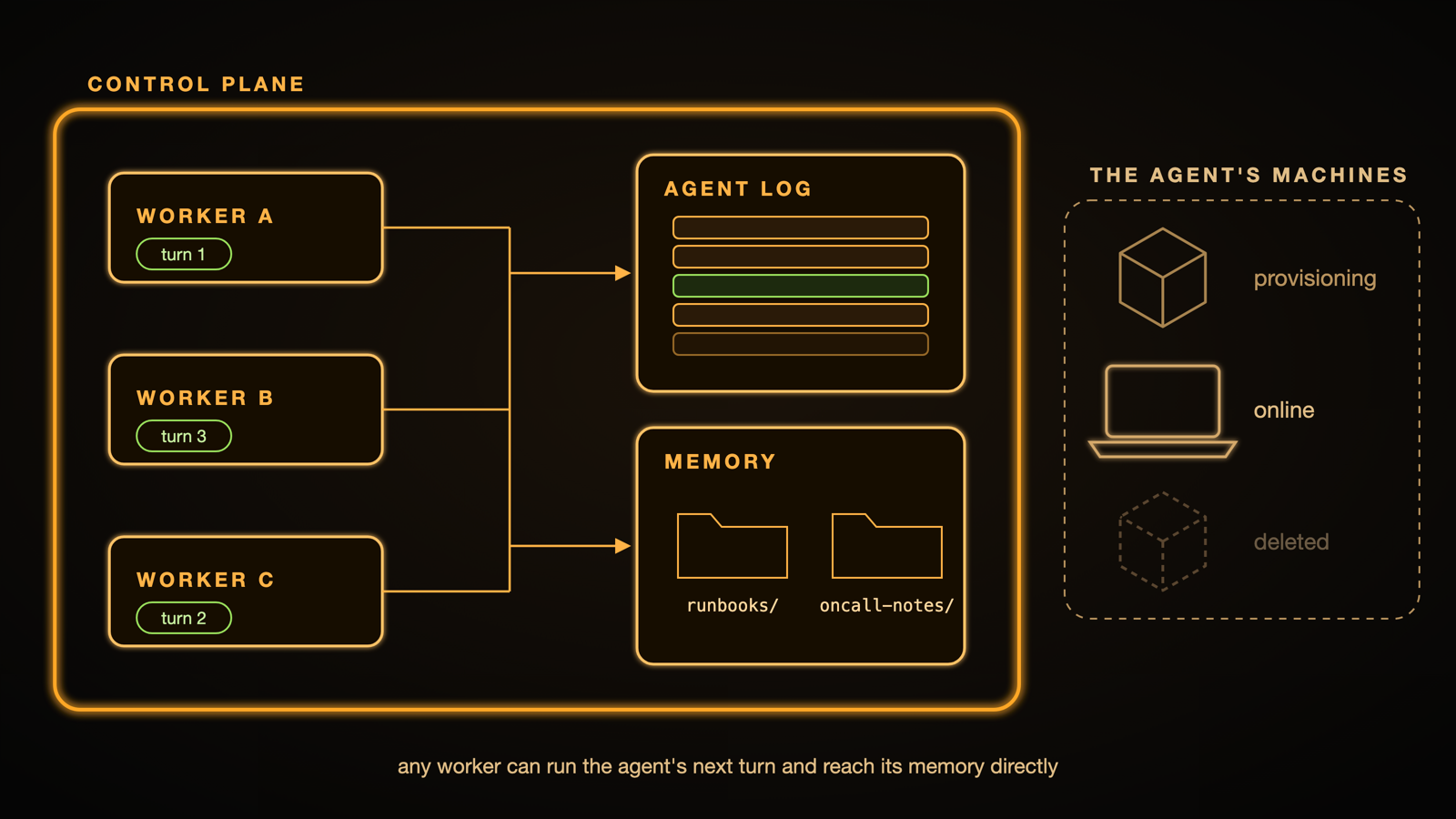
From the agent's side, memory is just directories. Give an on-call agent two stores, and listing /memory/* shows something like this:
Each directory is a memory store, a named folder of files that belongs to a project. You attach stores in the agent's config, each with read or read_write access:
Any number of agents can attach the same store and see the same files, and each one works with those files through four tools:
storage_listlists paths with globs, like/memory/oncall-notes/**/*.md.storage_readreads a file, paging through long ones.storage_searchsearches file contents with ripgrep flags.storage_writewrites a file, appends to it or edits it with asedscript.
Say the on-call agent from earlier gets paged in Slack about checkout timeouts in the middle of the night, with no machine attached. It starts by searching both stores at once:
The second hit is a note another agent left a week earlier, so it reads the rest of that file:
After posting the likely cause in the incident thread, it appends what it saw this time to the same note, so whichever agent gets paged next starts from there:
Nothing in that exchange touched a machine.
Another way to keep memory off any one machine is a network disk that every sandbox shares. Archil is built for exactly that with agents in mind. It turns a cloud storage bucket into a disk that many sandboxes can use at once. But a disk only knows what's on it, not which agent reads what, so it can't tell when an agent is about to overwrite another agent's changes. By default, Archil handles that with locks. An agent locks the part of the disk it's changing, and if it crashes while holding the lock, nobody can write there until someone releases the lock by hand. Locks don't stop an agent from writing back an outdated copy either, so Archil's own multi-agent example adds a version check to its write tool. It also makes the disk read-only in each agent's shell, so agents can't bypass the check by writing files with shell commands.
Omnara gets the same protection without agents tracking versions or sandboxes holding locks. Since memory isn't on any of the agent's machines, storage tools are the only way an agent can change it, so no shell command can skip the check. And any lock on memory is held by the control plane, never by a sandbox, so a crashed sandbox can't leave memory stuck.
Grep Without a Shell
Putting memory in the control plane answers one question, but it also raises a few more. The first is practical: if memory isn't on any of the agent's machines, how does an agent grep it?
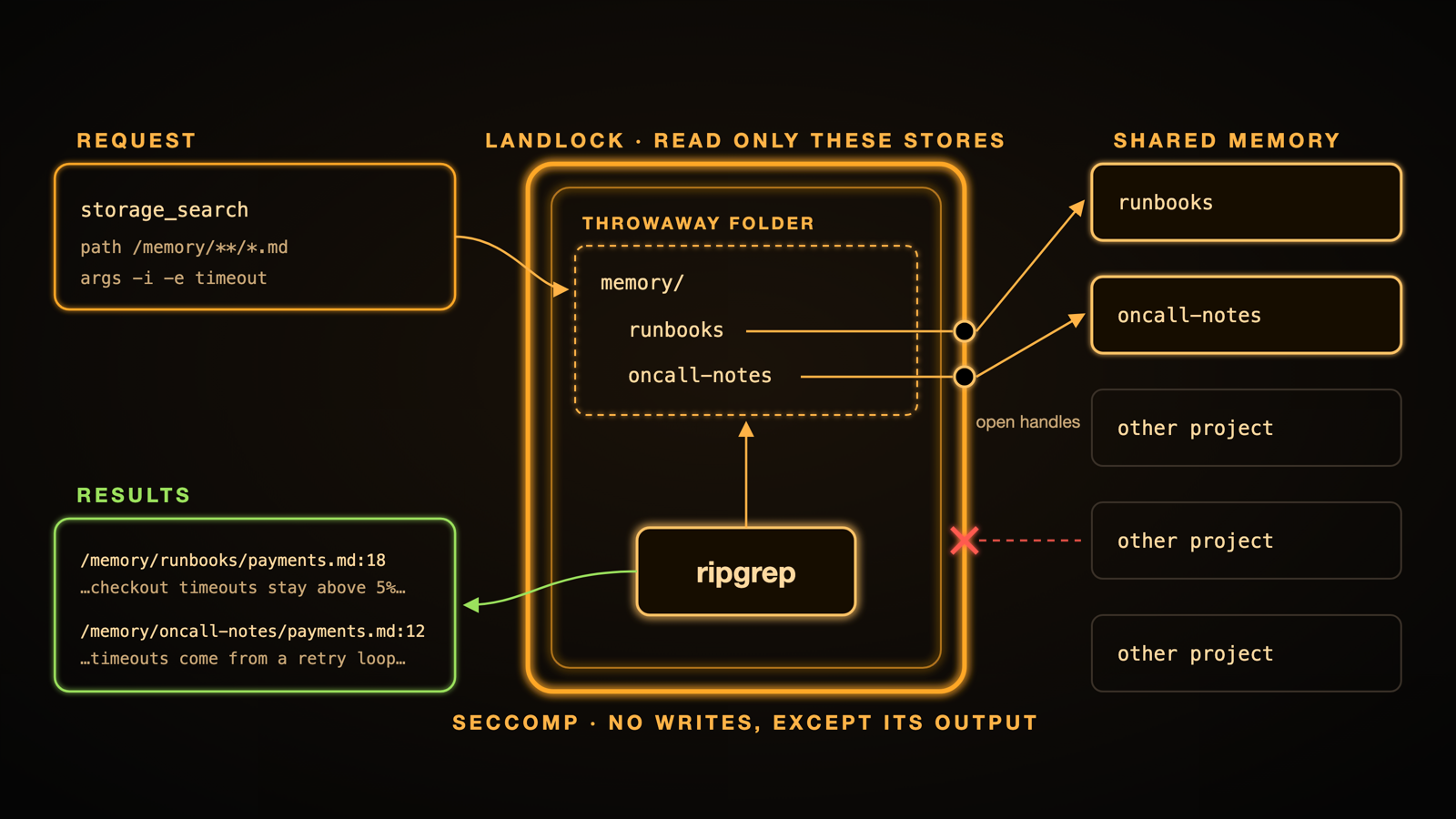
On a machine, the answer is easy: the agent opens a shell and runs grep. With memory, there's no shell to open, and there doesn't need to be. The worker running the agent's turn can already reach the files, so it runs the search itself. storage_search runs actual ripgrep, with ripgrep's own flags like -i, -w and -C 2, so agents search memory the way they already search code, and one call can cover every store the agent has.
The same worker can also reach every other project's memory, though, which makes search a security problem. So for each search, Omnara first checks which stores the agent may read and opens only those. It then builds a throwaway folder in which each store's name points at its already-open handle, and starts ripgrep inside that folder under two Linux kernel restrictions, Landlock and seccomp.
Landlock limits which files a process can access, and here it grants ripgrep only those open handles and the few system files it needs to start. Seccomp limits which system calls a process can make, and here it stops ripgrep from opening any file for writing, or writing anywhere but its own output. To ripgrep, the agent's memory looks like an ordinary directory, and no one else's files can be read from inside it.
Who Wins When Two Agents Write?
Shared memory means that two agents will eventually want to edit the same file at the same time. The simplest rule is last-writer-wins, but then the second edit quietly erases the first, and one agent's notes disappear without anyone noticing. A common way to prevent that is to have every write name the version it's based on, so a stale write gets turned away instead. For an agent, though, that would mean remembering a long version string for every file it touches and passing it back on each write.
Instead of giving that extra responsibility to the agent, the control plane can do that bookkeeping. Every time an agent reads or writes a memory file, Omnara records the file's digest in that tool call's result, hidden from the model, so the agent's own log holds the last version of each file it has seen. Because that history lives in the log rather than in any worker, it survives restarts and doesn't care which worker runs the agent's next turn. Changing an existing file requires that version to still be current.
When an agent writes, the new contents land in a staging area first. Omnara then locks the store, checks that the file still matches the version the agent last saw and moves the new contents into place atomically, so no reader ever sees a half-written file. If another agent changed the file in the meantime, the write fails with a conflict instead of overwriting it, and the agent reads the file again before retrying, unless it passes force: true to overwrite on purpose.
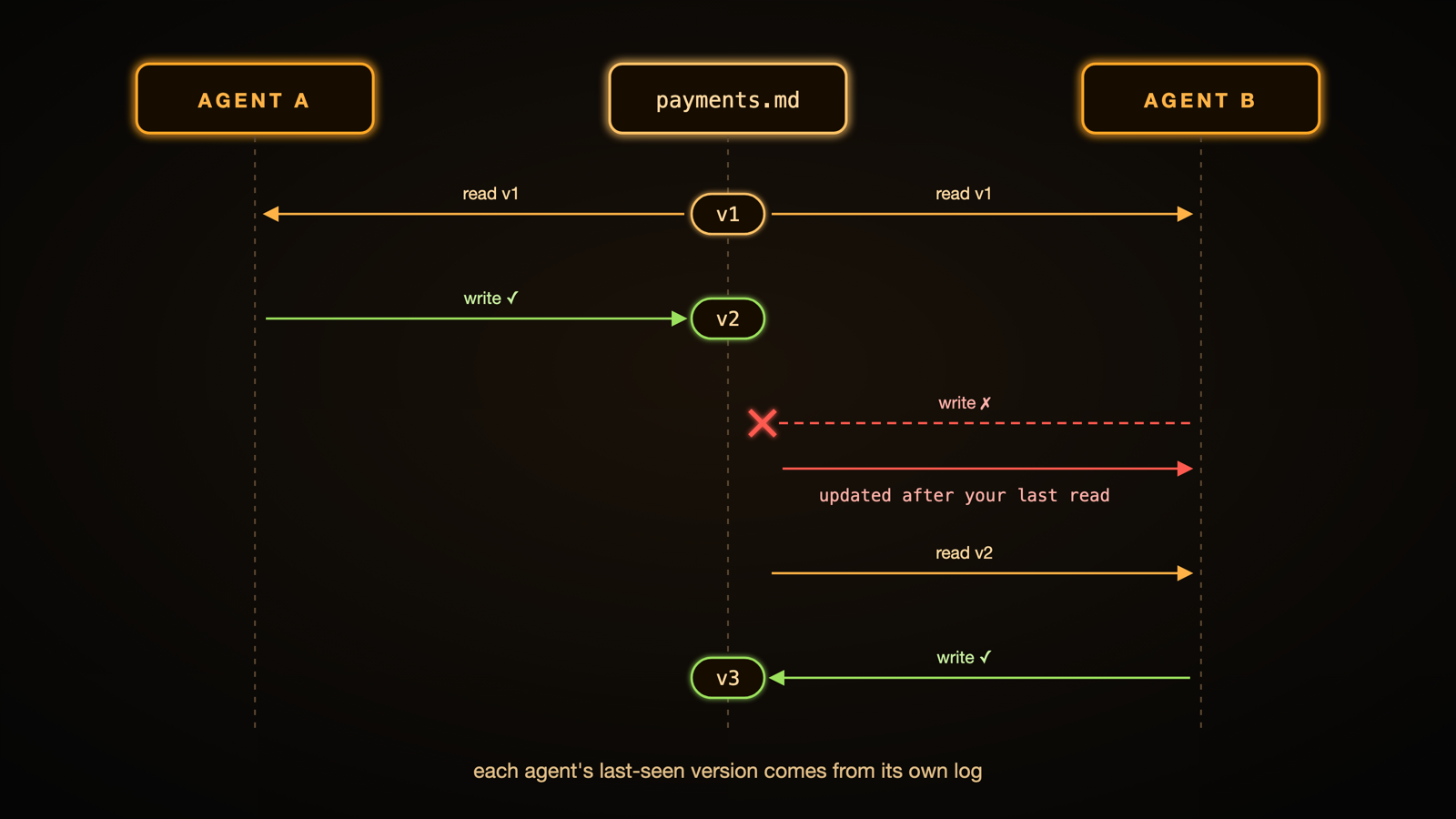
If a second on-call agent read that payments note earlier and tries to write to it now, it gets back this instead:
The same record also works in the other direction, so if a file changes after an agent reads it, the agent's next storage_read of that file says so.
What About Edits?
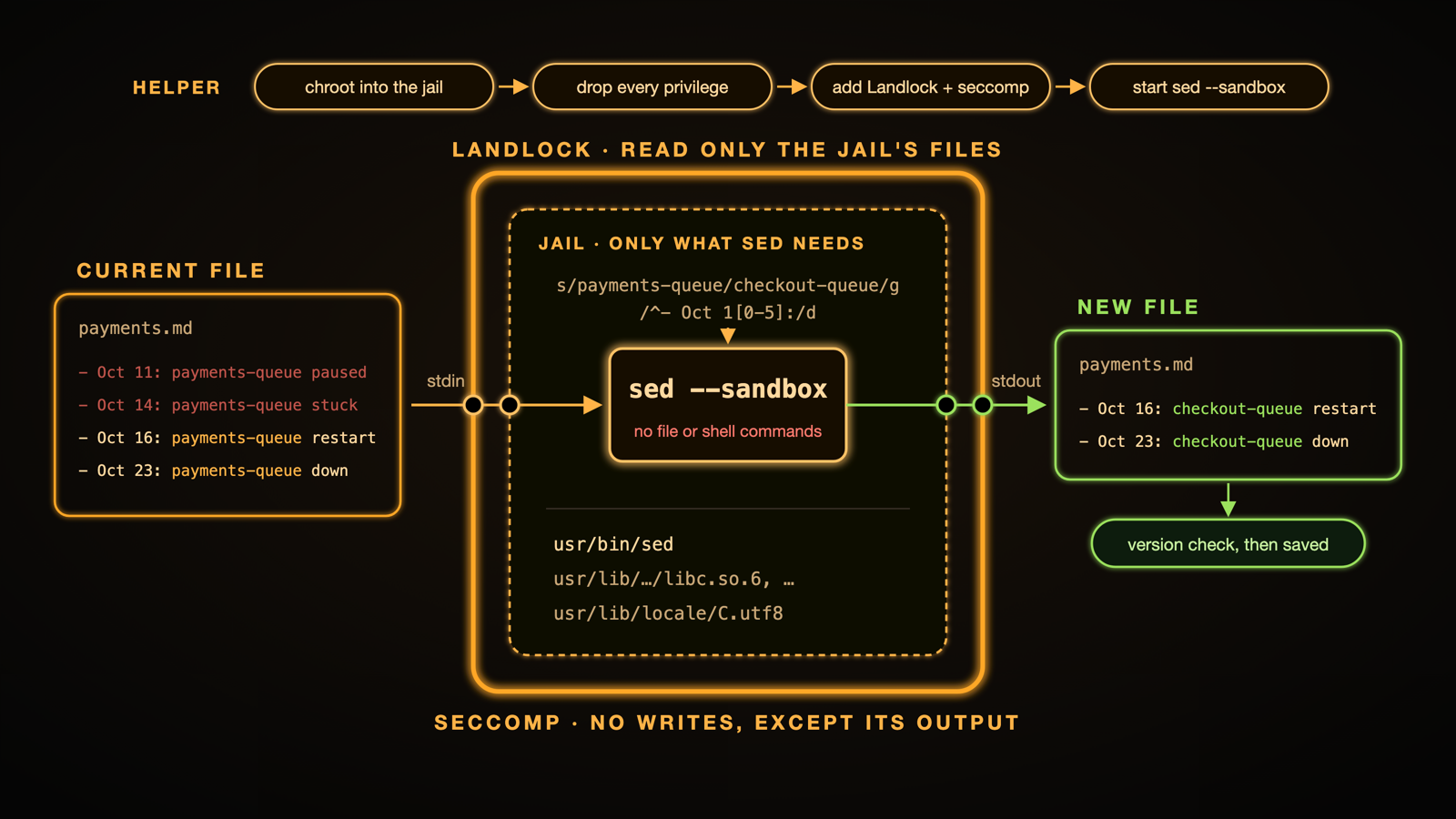
Rewriting a whole file to change one line is wasteful, so storage_write can also take a GNU sed script, which lets an agent fix one line in a 2,000-line file without sending the whole file back. One script can also make several edits at once, like renaming a queue everywhere it's mentioned and dropping notes that no longer apply:
Omnara feeds the file's current contents to sed on standard input and saves whatever comes out the other side, so an edit goes through the same version check as any other write.
Running an agent's script is a security risk, though, because sed is a small programming language with commands that can also read files, write files and run shell commands. Sed's own --sandbox flag turns those commands off, and Omnara runs it inside a small virtual jail that contains only what sed needs to run, under the same kernel restrictions as search.
Building that jail requires the right to change a process's root directory, which normally means running as root, and we didn't want workers to have that. Instead, a tiny helper holds exactly that one capability, uses it once to lock itself inside the jail, and gives up every privilege it has before starting sed.
Sometimes search and sed aren't enough, though, like when an agent wants to run a script over a CSV or render a chart from a data file. For that, it copies the file to one of its machines with storage_download, does the work there and sends the result back with storage_upload.
Like any other write, the upload won't overwrite changes the agent hasn't seen. If another agent adds rows to the CSV while the script is running, the upload is rejected instead of erasing those rows, and the agent downloads the new version and runs its script again.
The Payoff
A few benefits follow from putting memory in the control plane:
- Resilience. An agent can lose every machine it has and still remember everything it wrote down. An agent with no machine at all, answering a question in Slack, can read memory exactly the same way as one with access to fifty sandboxes can.
- Security. As agents get more capable and widespread, having control over what they can touch is important. Each agent only sees the stores it's given, with the access it's given. Every search and edit runs ripgrep or sed under kernel restrictions, so neither can touch memory the agent wasn't given, and the shell on an agent's machines can't reach memory at all. Those limits are enforced by the system, not by trusting the model to stay in bounds.
- Sharing. What one agent learns is there for other agents the moment it's written. Shared folders usually get ruled out for this kind of work, since nothing stops one agent from overwriting another's changes and the model can't be trusted to notice. Here the folders stay plain, but a write based on an old version is refused by default, so agents get the simplicity of shared files without stepping on each other.
- Search. Many memory systems are built on vector search, where every note has to be embedded and indexed before an agent can find it, and every edit means embedding it again. In a recent study, when search results came back inline, the way
storage_searchreturns them, agents answered long-memory questions more accurately with grep than with vector retrieval in all ten setups tested, including Claude Code, Codex and Gemini CLI. Here there's no index to keep up to date, because every search runs ripgrep over the files as they are right now. A note written a second ago shows up in the next search, and an exact error message or customer name is found whenever it's there. - Consistency. There's no copy to keep in sync. On Claude Managed Agents with self-hosted sandboxes, each worker downloads its own copy of every attached store and syncs changes back every 15 seconds or so. If another session changed a file since the last sync, the store's version wins, and the agent's edit is quietly replaced without it ever being told. In Omnara, every agent reads and writes the same files, so every read sees the latest version and no edit disappears without the agent knowing.
Conclusion
So where should agent memory live? Not in a sandbox, and not on any machine the agent might lose. In Omnara, it lives where the agent's log does, in the control plane, as normal files that every worker can reach.
Machines come and go, but what the agent learned stays.