How Cursor's Agent SDK Works
Agents as code, on Cursor's models
On this page
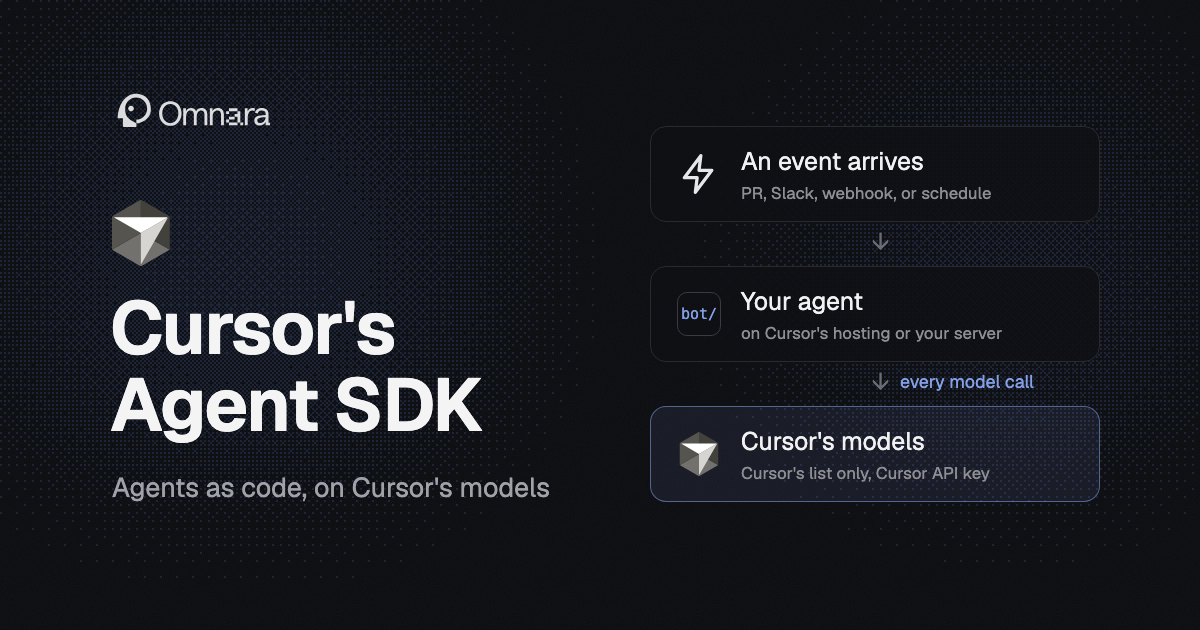
Cursor's Agent SDK is a framework for building agents as code, released in October. Cursor says it's what they use to build their own bots, like Bugbot, their pull request reviewer. You write an agent as a project: a prompt in Markdown, tools as TypeScript files, and the events that wake it up, like a new pull request, a Slack mention, or a schedule. Then you deploy it to Cursor's hosting or run it on your own server.
The Agent SDK is built on the Cursor SDK, an earlier library for running Cursor's coding agent from your own code. The Agent SDK runs an agent as its own service that waits for events. The Cursor SDK lets your code drive Cursor's coding agent directly. In both, every model call goes through Cursor, so you're tied to Cursor's model list, your Cursor account, and Cursor's service even when the agent runs on your own machines.
The Short Version
What It's Good At
For a team that's fine with only Cursor's models and a Cursor account, the Agent SDK's appeal is how little setup it takes to build an agent that reacts to events, from a new pull request to a Slack message to a nightly schedule. Each agent is a project laid out like this:
Its GitHub connection reuses the one on your Cursor account, so there's no webhook URL to expose, no GitHub App to register, and no token to manage. You decide in code which events start a conversation, and every event on the same pull request lands in the same conversation, so the bot remembers the PR when someone comments on it a day later. Slack, GitLab, Bitbucket, other webhooks, and schedules work the same way, and your own app can start a conversation through the agent's HTTP API.
Tools are TypeScript functions that run in the same server as the agent, so they can call your APIs directly, and you can run any tool yourself, without the model, to test it. Alongside your tools, the agent gets Cursor's coding tools for reading, searching, and editing files and running shell commands. For a bigger coding job, it can hand the work to one of Cursor's cloud agents.
It also comes with evals, which most agent frameworks leave to you. An eval sends the agent a fixed message and checks what it did: which tools it called, and whether the answer looks right. You can also replay a real pull request into your local agent to test it against something that actually happened.
The Cursor SDK
You don't need the Agent SDK to run Cursor's agent from code. The Cursor SDK, released in April, lets your code start Cursor's coding agent, give it a task, and read what it did. The agent runs either on your machine against local files, or on a Cursor cloud machine that clones your repo and can open a pull request when it's done:
Between Cursor's two SDKs, this one fits when your own code is in charge, like a CI job that fixes failing tests. The Agent SDK fits when the agent is its own service, waiting for events.
Each Cursor SDK agent works on one task at a time. And replacing the system prompt or adding your own tools only works when the agent runs on your machine, not in Cursor's cloud. Cursor staff said in October that the custom system prompt option isn't open to outside accounts yet.
We compare Cursor's Cloud Agents API with other cloud agent APIs in Cloud Agent APIs Compared, and cover running Cursor's agents on your own machines in Self-Hosted Managed Agents.
Every Model Call Goes Through Cursor
Whichever SDK you use, and wherever the agent runs, you're tied to Cursor's model list, your Cursor account, and Cursor's service. From Cursor's docs: "All inference goes through Cursor's hosted models in both modes." Self-hosting the Agent SDK moves the server, the tools, and the conversation history onto your machines, but every model turn still needs a Cursor API key and Cursor's service.
You pick models from Cursor's list, not your own endpoints or local models. The list is broad: Cursor's own models plus Claude, GPT, and Gemini. The Agent SDK defaults to Grok, which shows up across the docs because Cursor is now sold as part of The X Subscription, alongside Grok and X.
Neither SDK is open source. The Agent SDK package's README calls it open source, but its license says "All rights reserved," and there's no public source code. The Cursor SDK is proprietary too.
Usage Is Billed to Your Cursor Plan
Both SDKs are free to install, and Cursor lists no separate fee for hosting your agent or for its cloud machines. Model usage counts against your Cursor plan: included usage first, then each model's rate. Every conversation reports its estimated cost. Handing work to Cursor's cloud agents needs a plan that includes them, which on Cursor's current plans means Premium or higher.
Serving Many Users Means Enterprise
Building a product for your own customers is a supported use, according to Cursor staff. Running it for many users, though, means service accounts, which only come with Cursor's Enterprise plan. Cursor's terms also bar reselling the service, and they don't say how that applies to a product built on the SDK.
Changing a Hosted Agent Means a Redeploy
The prompt, tools, and model are files in the project, so on Cursor's hosting, changing any of them means pushing and deploying again. Conversations carry over the redeploy, so nothing in progress is lost. Secrets are the exception: a new secret value applies to the agent's next task without a deploy.
A message sent through the agent's API in the middle of a turn interrupts that turn and runs instead. On Slack, messages that arrive mid-turn get folded into the work instead of interrupting it.
Things to Know Before You Build on It
When you run the Agent SDK yourself, the sandbox is off by default. Shell commands run without approval and can see everything the server can, including its credentials. Turn the sandbox on before the agent reads anything untrusted, like pull request diffs or chat messages.
Install @grok/agent-sdk, the name in Cursor's docs. The package was renamed after launch, and Cursor's launch post and changelog use a name that doesn't exist on npm.
Accounts on Cursor's old privacy mode can't deploy to Cursor's hosting at all.
Agent SDK vs Omnara
Omnara is the open-source agent platform we build, and it's close to the Agent SDK in shape: an agent is instructions, tools, and the events that start it, run as a service. For an agent your team or your customers depend on, Omnara is the better choice, because nothing about it ties you to one vendor.
You choose the models. Omnara sends model calls to whatever provider you set up, with your own keys. The Agent SDK only runs Cursor's models, through your Cursor account, even when you host it yourself.
You can run all of it yourself. Omnara is Apache 2.0, and you can self-host the whole platform, including the agent loop and the conversation history. The Agent SDK is proprietary, and a self-hosted agent still needs Cursor's service for every turn.
You can change a running agent without a deploy. Omnara updates a running agent's model, tools, or instructions through the API, in the middle of a conversation. On Cursor's hosting, the same change means a redeploy.
It's built for your own users. Omnara is built for products that serve your customers, and the platform is free to use, so serving many users doesn't depend on an Enterprise plan. Custom tools are answered by your own backend, and agents run commands on machines you attach, several at once.
The Agent SDK has things Omnara doesn't: tools written as functions inside the agent's own project, built-in evals with pull request replay, and Cursor's tools for reading and editing code. Omnara's custom tools run in your backend and return results through its API, and its agents edit files with commands on machines rather than a dedicated editing tool. Those make a Cursor bot quick to build when Cursor's models and a Cursor account are all you need. For agents on your own models and servers, or in a product for your own users, Omnara is the better foundation.
FAQ
Is Cursor's Agent SDK open source?
No. Its README calls it open source, but the license says "All rights reserved," and the source isn't public.
Can I self-host the Agent SDK?
You can run the server yourself, which keeps the tools and conversation history on your infrastructure. Every model call still goes through Cursor with a Cursor API key.
How much does the Cursor SDK cost?
It's free to install. Model usage counts against your Cursor plan, with no separate fee for Cursor's cloud machines. Cloud runs need a plan that includes cloud agents, which on Cursor's current plans means Premium or higher.
What models does the Agent SDK use?
It defaults to Grok, and you can pick other models from Cursor's list, including Claude, GPT, and Gemini. You can't use your own endpoint or a local model.